This entry was posted on Saturday, November 21st, 2009 at 4:14 pm and is filed under Flash Menus. You can follow any responses to this entry through the RSS 2.0 feed. You can leave a response, or trackback from your own site.


Shake-SE.com
Shake ‘N’ SE
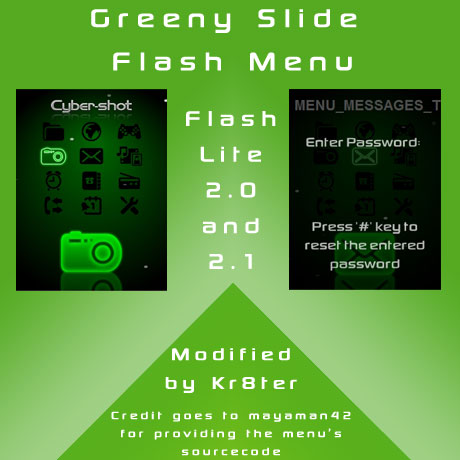
Greeny Slide Flash Menu

This menu was provided by mayaman42. I just modified it so it has the password protection feature. The menu only works on flash lite 2.0 phones, EG k850/w910i.
Credit goes to LCARS for creating the original menu
Customised Menus
mayaman42
naamtot
13 Responses to “Greeny Slide Flash Menu”
Leave a Reply

November 13th, 2009 at 6:13 pm
hello tks for your revolutionary menu ! no patch needed
could you please lock the items :
- message
- filemanager
- phonebook
- mediamanager
for the flash-menu uploded here [URL Removed]
Whit the code : ****
ps:tell us when you solve the shortcut problem ! Tks again
kr8ter – i have created the menu for you
November 22nd, 2009 at 1:22 pm
Hi thanks for the menu kr8ter.Could u plzz provide me with a fully locked greeny slide menu.I have a C905 and as u know that the menu can still be accessed with the shorkut keys and also if u change the main menu layout it can be accessed.Plzz provide me with the menu with these problems solved.Thankyou.
kr8ter – This menu is for fl2.0 phones only, it will not work on a c905, as it is a fl2.1 phone.
November 22nd, 2009 at 2:36 pm
kr8ter, what pass?)
The author of original menu – LCARS.
kr8ter – i have uploaded the menu with the password now, forgot to add it into the file. I did now know who the author of the menu was as the .swf and the .fla sourcecode were provided by mayaman42.
November 23rd, 2009 at 3:34 pm
Can you please give us this menus sourcecode?
Thanks
kr8ter – i have uploaded the sourcecode to the file
November 23rd, 2009 at 9:43 pm
Thankyou Kr8ter for your reply.Can i get a fully protected flash menu with the problems mentioned above solved with a menu compatible with C905 lika JumpaYello.If yes than make it with the same password as requested before.Thankyou once again and really appreciate your efforts into this.
kr8ter – i tried to modify it for the c905, but the thing is that the menu doesn’t have any extra icons in it for playnow, location services, and even if i did create them, they would look like the ones already in the menu, which will make the menu look odd.
November 24th, 2009 at 12:01 am
ooooh beautifull ! tks for your work !!! as you said I’m not the original author of the menu I just give the source code !!
November 24th, 2009 at 12:20 am
your work is so impressiv kr8ter ! but like in the 3R menu the animation goes to slow in my k850 like 2fps !! could it be because of the code you implement or is it just my k850 (some patchs are instaled)?? please k850’s users give feedback !
kr8ter – i tested this menu on my k850, and it ran fine, but i do agree with you on the 3R flash menu, as the animation was slow.
November 24th, 2009 at 11:35 pm
hi! thanks for working hard for these nice menus! im amazed! i just hope it will work on my g705 my crossflased w715?
any thoughts?
kr8ter – correct me if i’m wrong, but w715 is fl2.1, and this menu is only for fl2.0
November 25th, 2009 at 10:49 pm
still 2fps ! what SW do you have ? mine is R1FA035 generic, I don’t upgrade to the last one cause patch makers prefer that one ! btw the menu work fine whitout the pass addition ! any way to optimize ?
kr8ter – the sourcecode for the file is posted on the site, have a go and see if you can optimize it, as i can’t find a way to optimize it at the moment.
November 29th, 2009 at 4:41 pm
why is this menu too slow in my crossflashed w715??
kr8ter – truthfully i have no idea, all i did was add password protection to the menu, and it works pretty fine on my k850.
January 23rd, 2010 at 4:08 pm
hi kr8ter! this menu is cool. can u provide me a password-protected menu for this one? I would like the following icons to be locked: messaging, media, organizer and settings. the password is ****, my phone is w910. thanks!
kr8ter – i have created the menu for you
January 29th, 2010 at 12:22 am
Hi kr8ter! just wanna ask, where do i get the theme for this? thanks!
kr8ter – you can use any theme with this menu. There is a tutorial in the tutorials section, explaining how to use this menu with your own theme. Click here to view the tutorial
January 29th, 2010 at 11:47 am
hi.. just want to ask, what is the default password? i like all of you made flash menu but i cant proceed even if i enter the correct password.. 1234 is the correct password right? or can u provide me a no password menu in all of your flash menu.. i really do appreciate.. tnx
kr8ter – the password is 1234, is your phone flash lite 2.0, as the menu will only work with flash lite 2.0 phones.