Translate

Shake-SE.com

Shake ‘N’ SE

3R Flash Menu


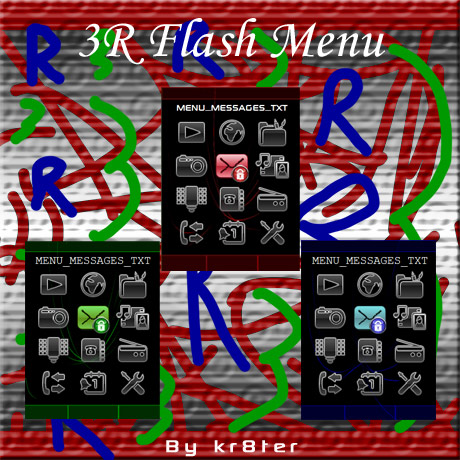
3R Flash Menu by kr8ter Preview


Here’s a new menu. This has password protection and can now rotate three different ways. The menu will also change colour throughout the day, it will go from red in the morning, to blue in the afternoon, and finally to green at night.


As before the menu will work on all phones, if the menu doesn’t work, then let me know. I have uploaded two different versions of the menu below, one which has the password protection feature, and the other one doesn’t.


Update (09-14-2009):

3R Theme by AquaVinka Preview


I have added a theme file with the menu, so it is now easier to install the menu. Credit goes to AquaVinka for the theme.


Update 2:


Thanks to Tom for reporting a bug in the menu, where the menu switches icons when you press 4/6. I have fixed the bug and have re-created all the menus including the customised ones.


Update (09-17-2009):


Thanks to AquaVinka for reporting a bug in the menu, where the menu would not lauch the icons in certain phones. I have fixed the bug, and re-uploaded the menu.


  • Click here to download the flash menu with password protection
  • Click here to download the flash menu without password protection
  •  

    Customised Menus

    Tom

  • Download customised menu for Tom
  • HELCKAT

  • Download customised menu for HELCKAT
  • ChilliBo

  • Download customised menu for ChilliBo
  • lovedimpy

  • Download customised menu for lovedimpy
  • ciaann

  • Download customised menu for ciaann
  • tery

  • Download customised menu for tery
  • mayaman42

  • Download customised menu for mayaman42
  • naamtot

  • Download customised menu for naamtot
  • nonamehere

  • Download customised menu for nonamehere
  • grateful

  • Download customised menu for grateful
  • Manuela

  • Download customised menu for Manuela
  •  

  • All comments are appreciated!


  • 47 Responses to “3R Flash Menu”

    1. HELCKAT Says:

      very good

    2. Tom Says:

      Would you be so kind and make this menu with lock on Messages and Media with code ****?

      kr8ter – removed your password for your security ;) , i have uploaded your menu

    3. HELCKAT Says:

      hello, very good flash menu, I wanted to ask if he could set the password to the entire menu from the internet, camera, radio and all access requests the password “*”"*”"*”"*”thanks.
      good locki

      kr8ter – removed your password for your security ;) , i have uploaded your menu

    4. ChilliBo Says:

      Nice work! Can u change pw to **** please and upload it for w995? Would be great :) greetz Chillibo

      kr8ter – removed your password for your security ;) , i have uploaded your menu

    5. Arun Says:

      Wilu u help me hw wil i change password for my w910i

      kr8ter – just post the password you want here, and i will make it for you. Don’t worry no-one will see your password, as i have to manually approve the comment before it goes onto the website.

    6. anubisthejackal Says:

      prosim o pridani souboru thm,neumim to bez nej dat do me w910,aby menu fungovalo.nebo poradte,diky

      kr8ter – i have added a theme file for the menu now.

    7. Tom Says:

      Found a bug. When you set my password, it can’t include 4 or 6. When I type my password with those numbers, menu switches to the icon on left/right (4 and 6). It’s very annoying :[

      kr8ter – thanks for reporting it, i have fixed and re-uploaded all them menus

    8. anubisthejackal Says:

      děkuji!!!funguje skvělě!!!

    9. lovedimpy Says:

      great menu….
      i have W995 -R1FA035.
      I am requesting the menu, with All Item locked with password- ****…

      kr8ter – removed your password for your security ;) , i have uploaded your menu

    10. AquaVinka Says:

      kr8ter, menu dont’t work оn W902. Nothing happens when press the keyboard.

      But on W910 it’s OK))

      kr8ter – thanks for reporting the bug, i have fixed it now and it should work, if it doesn’t then let me know

    11. Warren Says:

      Hi uploaded the theme today but nothing works, when you press the keyboard the icons dont move. i have a c902. please let me know how to fix this
      Thanks

      Comment #2:
      Hi i have c902, when pressing the buttons the icons dont move- please help. love this theme.
      thanks

      kr8ter – try downloading the menu again and re-uploading. If you still get a problem then let me know

    12. Tom Says:

      Could you do this what you did on Impossible Menu on this? And you haven’t repaired this bug with lock name on other icons. If you exactly don’t know what I’m talking about, I’ll upload video with this problem.


      kr8ter – If you wouldn’t mind, could you upload the video because i have checked the menu and it uses the phone’s language for the icons, and the numbers 4/6 can be used without any problems.
      Thanks

    13. Warren Says:

      hi, sorry,tried uploading it again, the menu is there but i can not use the select key to go into the icons. please help. my mobile is a c902. love your work.


      kr8ter – Are you uploading the locked menu or the unlocked one, because previously i only fixed the locked menu and forgot to upload the unlocked one. I have now re-uploaded the unlocked menu.

    14. Warren Says:

      Do you know how to remove the operator logo? i have a c902


      kr8ter – Click here to download the file. Open A2 Uploader and goto /tpa/system/layout/. Look for a file called “layout_main.xml”, right click the file and click “Read”. This will make a backup incase something goes wrong. Now extract the downloaded file and upload the extracted file.


      If it doesn’t work then just re-upload the original file, the file should be in the “ph_out” folder, which is located in the folder, where A2Uploader is.

    15. Warren Says:

      Hi, thanks for the info, when i click on your link it brings up an error sayin” sorry , what you are looking for is not there” please help

      kr8ter – sorry about that, there was a typo in the link. I was just about to test it, but you beat me to it. :)

    16. Warren Says:

      hi, the menu still does not work, any answers? the backround is there but the icons dont move or select!
      thanks.

      kr8ter – try the menu again, it should hopefully work now. Let me know if it works.

    17. Warren Says:

      hi, thanks for the xml file- the operator logo is gone.

    18. JAyR Says:

      hey can you change the background of the menu?

      kr8ter – Upload the picture to an image hosting site such as imageshack, and then post the link here and i will create the menu for you.

    19. JAyR Says:

      hey i have w902…why didnt the flash menu worked?the menu is still the same…a normal menu

      kr8ter – Did you use the theme provided or did u modify the theme you are using, so that it will call/load the flash menu

    20. AquaVinka Says:

      Menu works on W902, but there is no selected camera icon.

      kr8ter – I have fixed it, the icon has been changed and should now have a selected icon.

    21. AquaVinka Says:

      Thanks, kr8ter! It’s all right now!

    22. Tom Says:

      kr8ter, what bout my comment and my problem?

      kr8ter – i have re-uploaded your menu, and have fixed the problems described in the video. It should now work, if it doesn’t let me know. :)
      Click here to download the menu

    23. Jayr Says:

      I used the theme provided in my w9o2. .but n0thng change in the menu it still the n0rmal menu. .wat should i do?

      kr8ter – Did you modify the theme, so it called the flash menu, there is a tutorial on how to install it, click here to view it

    24. ChilliBo Says:

      hey kr8ter. Can u do me a fever and costumize this menu [removed] for w995 please? Would be nice.

      kr8ter – i have created it from scratch, it may not be perfect, but this is as close as i can get it to be. Click here to download it. Let me know if it works.

    25. Warren Says:

      Hi, sorry for the late reply, i tried uploading it again but this time the icon selects but it does not go into the menu, it just blacks out all the rest of the icons.

      kr8ter – try the menu again, it should hopefully work now. Let me know if it works.

    26. Warren Says:

      Hi, it works like a charm, thanks for all your help.

    27. Warren Says:

      Hi, i was wondering if you have an e-mail addresse, i have a file that i want you to take a look at and give me your thoughts- its a se c902 custom menu but i cant get the icons to move. let me know. thanks

      kr8ter – could you upload the file to a file hosting site such as rapidshare, megaupload, mediafire, etc and then post the link here

    28. ChilliBo Says:

      Did u checked my post kr8ter?

      kr8ter – I’m currently working on, i’ll post it here once its done

    29. ChilliBo Says:

      Allright thanks for ur time :)

    30. ChilliBo Says:

      hey kr8ter.
      are u ready with my menu? still waiting ^^

      greetz ChilliBo

      kr8ter – go to the 24th comment, i have posted it there.

    31. Ady Says:

      You have posting flash menu for W890i..?

      kr8ter – the menus on the site should work on the w890, try them and if they don’t let me know and i will try to make them work for your phone.

    32. حماده Says:

      برجاءارسال كلمة السر

      kr8ter – كلمة السر الافتراضية هي 2580

    33. ciaann Says:

      Hey kr8ter
      Another great theme..
      can you make me one with lock on Messages, Organiser and Media?
      And can yeahh make te password ****? :)

      kr8ter – removed your password for your security ;) , i have uploaded your menu

    34. tery Says:

      Comment #1:
      Hi kr8ter, can you make me one with lock on message,organiser and media?my phone was w995 R1GA026…thanks in advance….cheers

      Comment #2:
      should i give u password so u create that for me?my prefer pw is ****

      kr8ter – removed your password for your security ;) , i have uploaded your menu

    35. tery Says:

      thank you so much..

    36. mayaman42 Says:

      Comment #!:

      hello ! first of all tks for all your menus !
      I don’t know for other people but whit my K850 the menu is too slow and navigating is painfull ! can you make a 2.0 flash-lite version of this menu cose I like changing-ove-time menus very much ;)

      Comment #2:

      oh I forgot my pass here : **** tks again !!

      kr8ter – removed your password for your security ;) , i have uploaded your menu

    37. Aamir Says:

      File not supported at fone wats mean.

      kr8ter- what phone have you got

    38. Serge c902 Says:

      I noticed one thing. In C902 if to use the password-protected menu,there is an easy way to overcome it – menu-options(clicking “options” with a left upper key)-main menu layout-any… then you can read messages and so on. SO, I see it is important to block that “options” with a password. Is it possible to do that?

      kr8ter – i don’t think you could get rid of that option using adobe flash, but there maybe a patch avaiable on the internet, which will disable that option.

    39. naamtot Says:

      Hello kr8ter! Great job with the menus. Very original. :)
      Can you make a menu for me with the password ****.
      I’d like the following items to be locked: messaging, media, organizer, and settings.
      My phone is w910i.

      Thanks! :)

      kr8ter – removed your password for your security ;) , i have uploaded your menu

    40. nonamehere Says:

      Hi kr8ter! Could you personalize this menu for me by setting the password to ****? Thanks much! :)
      By the way, my phone’s a C905.

      kr8ter – removed your password for your security ;) , i have uploaded your menu

    41. naamtot Says:

      Hi kr8ter! there is something wrong with the flash file you gave me, when i tried to create a shortcut, the passwords were disabled. So anyone can access the locked menus when they will create a shortcut in my phone. I would also like to remove the lock in the menu MEDIA, so the remaining locked menus are messaging, organizer and settings. My phone is W910i. Password is still ****. Thanks a lot! :)

      kr8ter – i have re-uploaded your menu. There is nothing wrong with the flash file, as that happens to all fones.

    42. grateful Says:

      Hello kr8ter! Would you please make the menu with password ****. Thank’s a LOT! Great job!

      kr8ter – removed your password for your security ;) , i have uploaded your menu

    43. Manuela Says:

      Comment #1:
      Hello kr8ter! Great job on this menu :) Can you lock it with ‘****’ as a password?

      Comment #2:
      Me again Since this kind of passwords are made of numbers, I’d like the combination to be ****, tnx

      kr8ter – can you pick a 4 digit passcode please, as that is what i use for the menus. Thanks

    44. Manuela Says:

      Ok, then if you can make it to be ****:)

      kr8ter – removed your password for your security ;) , i have uploaded your menu

    45. Chris Says:

      Nice menu. Can you upload it for the w760i. no password

      kr8ter – A download link to the menu without the password protection is available, it is underneath the download link for the pass protected one

    46. Chris Says:

      I tried that one already and it doesnt work. I try to change it to a theme file but it stays as a shockwave flash file.

      kr8ter – re-download the file and upload the theme file to your phone and upload the menu shockwave file to your phone using A2uploader, there is a tutorial on this in the ‘Tutorials’ section.

    47. goutham Says:

      thank u
      good work

    Leave a Reply

    Your Ad Here