This entry was posted on Saturday, October 31st, 2009 at 6:39 pm and is filed under Flash Menus. You can follow any responses to this entry through the RSS 2.0 feed. You can leave a response, or trackback from your own site.


Shake-SE.com
Shake ‘N’ SE
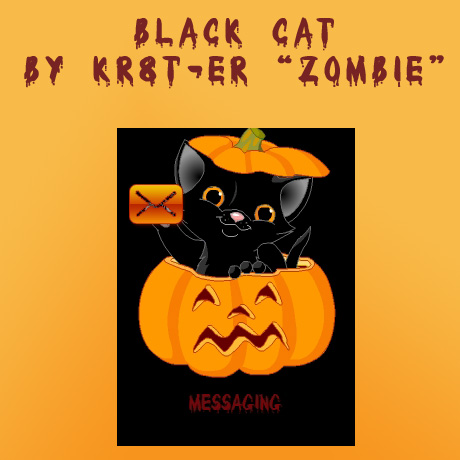
Black Cat Flash Menu

Here’s a menu for halloween.
Update (14-12-2009):
I have re-written the code for the menu as a couple of people were having issues with the menu, if you were having issues then re-download the menu and test it to see if it works now. If it doesn’t then just let me knowThanks
Update (22-12-2009):
I have updated the code and changed it around, so it should resolve the issues some people are having with the menu not working properly. If you still have any issues then let me know.Thanks
15 Responses to “Black Cat Flash Menu”
Leave a Reply

November 3rd, 2009 at 8:12 am
Is it only FL 2.0?
kr8ter – the file should work on fl2.0 and 2.1, if it doesn’t then let me know, and i’ll try and fix it
November 4th, 2009 at 12:43 pm
Don’t work on C510((
kr8ter – thanks for letting me know, it should work know, if it doesn’t then just let me know
November 14th, 2009 at 8:20 am
WOW men its a great work…..if u make some more shake themes for w595???if u can please send me an E-mail plzzzz
kr8ter – i’m currently working on a few projects at the moment
November 16th, 2009 at 7:20 am
it does work on w995 ???
kr8ter – it should work on the w995, if it doesn’t then let me know
November 16th, 2009 at 7:21 am
and maybe u can upload or create a compatible theme for this? would be nice =)
regards ChilliBo
kr8ter – you can use the menus with any theme you want, there’s a tutorial on how to do this in the tutorials section
November 27th, 2009 at 8:09 am
NOT WORKING ON W595 MAYBE U SHUD CREATE A FLASHLITE 2.1 FOR DIS MENU
kr8ter – it should work on w595, as the menu seems to work for nipz, he has posted a comment above.
November 29th, 2009 at 9:57 am
is it flashlite 2.1
kr8ter – its both flash lite 2.0 and 2.1
December 1st, 2009 at 11:34 am
i want only flashlite 2.1 da menu is partly working but the icons are remaining unaltered on my w595 pls upload a flashlite 2.1 of this menu i beg of u
kr8ter – can you tell me what you mean by saying the icons remain unaltered, are they not showing up, or are the wrong icons showing???
December 12th, 2009 at 1:28 pm
well i can highlight da icons but when im selecting an icon da phone isnt taking me 2 da navigration………:( i like ur menu man nd i’ll do anything 2 make it work on my phone
kr8ter – i have re-written the code, and based the code upon one of my other menus, so it should now work fully, if it doesn’t then let me know
December 15th, 2009 at 3:53 am
still not workin…….:(
kr8ter – i have made some changes to the file, just re-download the file, and hopefully this time it will work
December 16th, 2009 at 11:19 am
the menu has improived a bit but i cant still enter da navigration,not working properly….:(
kr8ter – i have updated the menu, try downloading it again, it should work
December 16th, 2009 at 5:54 pm
This also nice flash menu but it’s not working on my w890i, pitty.
Can you make it work on my w890i…?
FL 2.0 size 240×320
kr8ter – i have updated the menu, try downloading it again, it should work
December 24th, 2009 at 3:30 pm
I tried today, its work properly now in my W890i..
Really great and cool….. thanks a lot.
December 30th, 2009 at 3:43 pm
Is it possible to give password protection?
Would be nice if this flash menu with password protection.
kr8ter – i was thinking of adding password protection on to this menu, but i changed my mind because of all the problems i had with it
January 8th, 2010 at 6:11 pm
thanks for da menu it works properly