How to change the background of a flash menu

Posted by kr8ter On June - 10 - 2010

Change Background Tutorial by kr8ter Preview

Here is a tutorial to help you change the background of a flash menu.

The things you will need are:

  • Adobe Flash installed on your computer
  • The source code of a flash menu (.fla file)

Now lets begin, first you will need to open the flash menu by double clicking on the .fla file, this will load Adobe Flash.
Screenshot 1

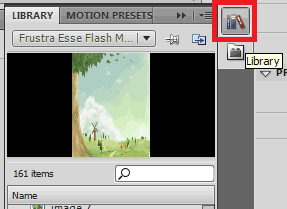
Now click on the “Library” icon

Screenshot 2

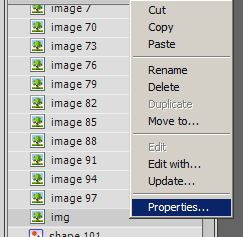
Now look for the original background and right click it and click “Properties”

Screenshot 3

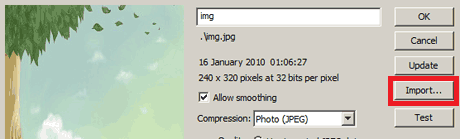
Now click on “Import”, and a window will appear

Screenshot 4

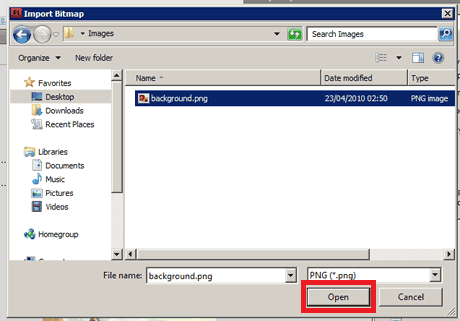
Select your image file and click on “Open”.
Make sure the image is 240×320

Screenshot 5

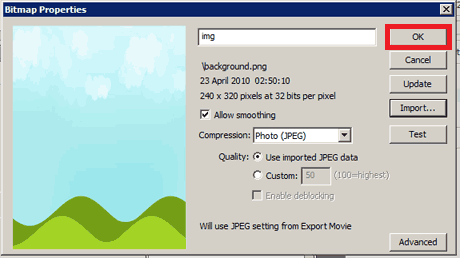
You will see your image on the right and just click “OK”

Screenshot 6

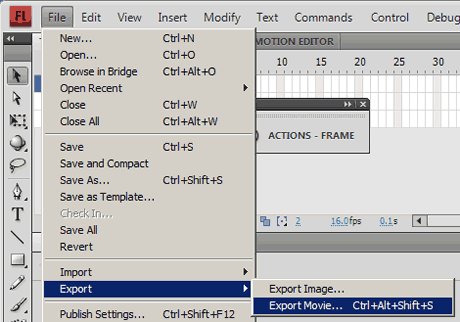
Finally, goto File -> Export -> Export Movie.

This will create your flash menu, with your own background.

Now all you need to do is upload it onto your phone. There is a tutorial on this in the “Tutorials” section.

That concludes the tutorial, if you get any problems or if the tutorial doesn’t work, then just post a comment. Thanks

15 Responses so far.

  1. Abrar says:

    hello kr8ter,
    first of all i would like to say that this site is awesome :D i’m just wondering that how do i get the source code of a flash menu (.fla file)?considering that all flash menu is in .swf, i guess…

    • kr8ter says:

      Hi Abara, I have put up some sourcecodes for some of the flash menus such as the Simply Yari flash menu, Touch flash menu, Greeny Slide flash menu, etc. If you want the fla file for another flash menu, just tell me which one you want and what phone you are using, so I can give you the correct fla file using the correct Flash Lite version.

  2. Bhuban says:

    brother this site rockzzz.but could u give me any one .flafile for my w595 phone.specially sreeny slide flash menu’s.and by d way by which soft u explain the tutorial.plz suggest.thanx.

  3. zafar says:

    thise is a very good theme

  4. Bhuban says:

    hello brother it’s bhuban again.i’ve only adobe flash cs3.does it applicable for all the flashing design which u have on ur tutorial.or any higher version required for any of the tutorial.

  5. Jigar says:

    Can u Please suggest some useful stuffs from this site for se zylo w20?
    I want to know what can i customize in my phone??
    and where can i create own themes for zylo?

  6. Ruzlien says:

    i’ve seen your video in youtube that leads me here to leave a response. . .i already read the comments and maybe im just little bit dull .can you give me an theme that will work for my ELM????please . . .i Really like those themes you showed. .its kinda awesome but i just dont know how to do it.any theme will do.hope your willing THANKS

    • kr8ter says:

      Hi Ruzlien, I only have one video on Youtube, which shows you how to use the Rotating Logo application, so I’m interested in knowing which video you have watched. Also, if you search for “elm” on this site, all themes compatible with your phone will be listed. Currently, the Twitter, Prince of Persia, and Sliding Tux support your phone.

  7. vindows says:

    hi kr8ter, to work adobe flash cs3 shall i have to download any other softwares like adobe flash debugger.

*

  • View flash content for Sony Ericsson phones
  • View Android content
  • Visit the community forum
  • Like us on Facebook
  • Follow us on Twitter
  • +1 Shake-SE.com
  • View our YouTube channel
Rotating Logo Creator

Rotating Logo Creator

This program will create a rotating logo for your sony ericsson phone, no p...

Your Ad Here