How to debrand your phone using Omnius

Posted by kr8ter On August - 23 - 2010

How to debrand your phone using Omnius Tutorial by kr8ter Preview

Here is a tutorial to help you debrand your phone, so you can enjoy all of your phone’s features and remove the operator branding.

This method is not free

DISCLAIMER:
Use this tutorial at your own risk, i am not responsible for you damaging your phone. (Nothing should go wrong if you just stick to the tutorial)

Before we begin, make sure you have backed up everything on your phone and take out the memory card

Part 1: Changing your phone’s CDA

1) Go here and register and activate your account
http://www.omnius-server.com/um/registration

2) Go here to download Omnius and extract it using WinRAR
http://www.omnius-server.com/download
Step 3

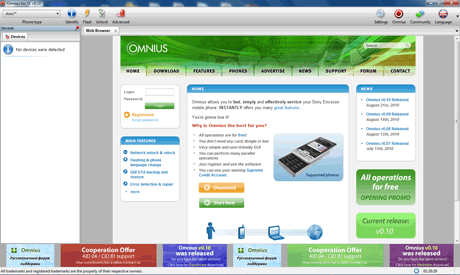
3) Now double click “omnius_se.exe” and Omnius will now load

Step 4

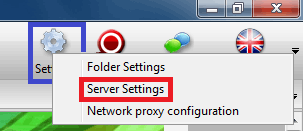
4) Click on “Settings”, then click on “Server Settings”

Step 5

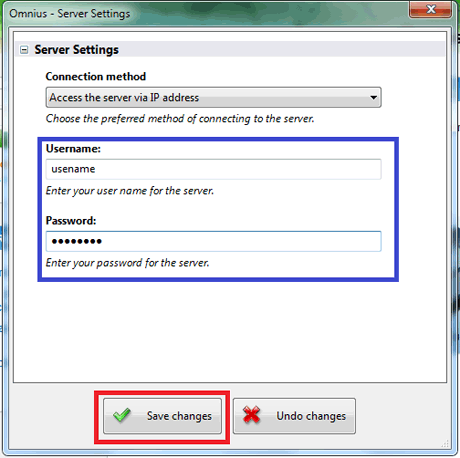
5) Now the username and password of the account you created and then click on “Save changes”

Step 6

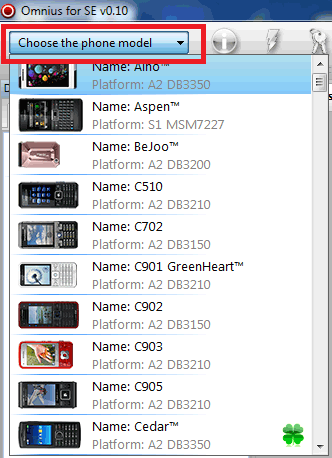
6) Now choose your phone from the drop down menu
Step 7

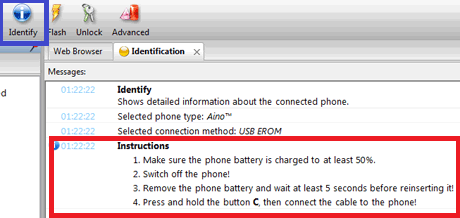
7) Now click on “Identify” and follow the instructions. This is to make sure your phone can connect to Omnius and everything is working well
Step 8

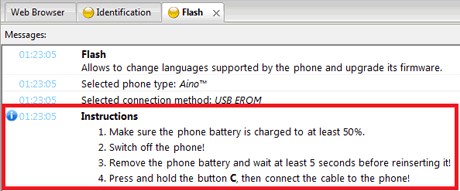
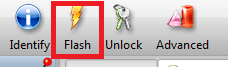
8 ) Now that everything is working well, click on “Flash”

Step 9

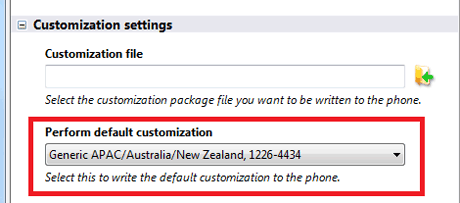
9) Now choose a generic customization and then click on “OK”

Step 10

10) Now just follow the instructions

11) Once finished, turn on your phone and go to “Menu->Settings->General->Master reset” and choose “Reset all”

12) After the reset, turn off your phone

Part 2: Debranding your phone

  1. 1) Click here to download the Sony Ericsson Update Service, if you don’t have it installed on your PC
  2. 2) Run the Sony Ericsson Update Service
  3. 3) Follow the instructions

If everything went smoothly, enjoy your debranded phone

That concludes the tutorial, if you get any problems or if the tutorial doesn’t work, then just post a comment. Thanks

28 Responses so far.

  1. neilu says:

    hi i’ve tried all of the above on my w995, but when i turn on the phone after updates it still has the 3 logos and won’t let me connect to the internet. any ideas would be greatfully recieved.

    many thanks, neil

  2. Ajing says:

    Hi kr8ter, i want to do this but can u explain me the details/benefits if its worth for me? i want to know what i can do after debrand my aino, the difference if i convert my phone red to brown by buying credits and why others want to convert to brown to access .ic file what we can do for that? thanks a lot

    • kr8ter says:

      Hi Ajing, the main reason people debrand their phone, is to be able to use flash menus, as the operators sometimes disable this feature. Also, some people want to get rid of the networks branding software, for some reason. If you are happy with the phone and can use flash menus, i would advise against debranding, since you won’t really gain a lot (Phone maybe slightly faster and might get more apps, but you can download the apps from Google, anyway).

      Also, changing the phone from red to brown, is used to patch the phone, I.E. the .ic file contains icons, which you can change such as the battery icon, etc. I’m not too sure how hard it is to patch your phone and create custom icons and upload them to your phone, but i hardly think it will be easy.

  3. santosh says:

    hello
    i did as follows in c905, but the myworld logo is not going! i want the contacts tab in my right soft key, but it still shows my world logo

    • kr8ter says:

      Hi santosh, try running Omnius again, and after its done turn on your phone, it should show some kind of pop up saying please wait. Then turn off the phone and follow the rest of the tutorial.

  4. louiwse says:

    hiya

    ive debranded my w995 and its not flashed my text themes im still getting a white text box, i have a pink w995 with latest software, why wont it change my menu screen or my text themes. it is locked to network but i cant see that making a difference.
    ive flashed it and paid to unbrand it.

  5. Rishabh says:

    is there any alternative(free) option for debranding se phones(Aino)…

    • kr8ter says:

      Hi Rishbah, i’m not sure if there is a free one, i’ll look around on the web to see if i can find one.

  6. louise says:

    yeah tried that still not flashed my menu screen, just have to wait til my phone a lil older i guess

  7. Tamim says:

    will this work for se k770i (cid 53)???

  8. theboypm says:

    will it work on k850i

  9. danny19901 says:

    apparently jdflasher is buggy and if you use it everything you have done to your phone disappears after reset

  10. danny19901 says:

    Have any one tried A2uploader

  11. danny19901 says:

    im trying to get rid of my orange menu on w995 and i have tried this with omnius and finishing the installation with sony ericsson update service i have also tried using A2uploader but it won’t let me copy files over when im in file system tool i love the phone i just wish phone company operators didn’t put there own software on and stop flash menu’s i mean if you buy it it’s your’s they shouldn’t be able to do that stopping flash menu’s there making the phone’s worst

    • kr8ter says:

      Hi danny19901, Yeah i agree with you, I really don’t understand why they stop you from installing flash menus. Did you follow the tutorial on how to debrand your phone using A2Uploader, you basically generate an XML file with the program provided, and upload it via A2Uploader, this is a simple drag & drop, finally you update your phone.

  12. Danny19901 says:

    ok i have changed a few things on my phone such as text and media player layout but still the orange menu will not go

    • kr8ter says:

      Hi Danny19901, you could try loading a different theme with a different flash menu, or you can use FarManager/A2Uploader and goto /tpa/preset/system/desktop/flash and delete the orange flash menu.

  13. Danny19901 says:

    I have done what you said but nothing shows in /tpa/preset/system/desktop/flash folder nothing is in there at all so i deleted the folder still orange menu i have also downloaded flash menus and tried to use themes with flash menus and use it but it won’t allow me and sorry for being a bit of a pest with all questions

    • kr8ter says:

      Hi Danny19901, sorry for the late reply, I have updated the the debranding tutorial with A2Uploader, I have added a much more up-to-date program, to generate the customize_upgrade.xml file, which you upload to /tpa/preset/custom. Then you turn your phone on, after the “please wait” message disappears, simply update your phone using the Sony Ericsson Update Service.

  14. Harendra says:

    will it work on sonyericsson elm, i need only install flash menu themes. What do i select (cda)

    • kr8ter says:

      Hi Harendra, it should work on the Elm, as it supports it. If you want to debrand it, then in the “Customisation settings” box, select which is closest to you, for example if you lived in France, then you would select “Generic Western Europe”. After you have done this, you can install flash menus using FarManager, there is a tutorial available on this site.

  15. Venky7 says:

    Hello sir,
    I m looking for flash menu tutorials since ever I bought my cell (nearly 6 months). Including ur’s.I have se hazel but i m not able to use flash menus. I came to know from ur blog that after debranding I can use such menus. I want to debrand my cell but I m not getting which generic customisation I have to select. I m from india. Mine is south asia gc. Now I want to know that if I change that to some other gc whether it helps me using my local networks. Or it affects my cell Or if I select same gc I want to know it will debrand
    My cell or not. I have tried all tutorials except omnius And also pls suggest me which software I have to use for it…?
    Sorry for bad english waiting for reply…..

    • kr8ter says:

      Hi Venky7, remember that Omnius is not free. As long as you select a customisation which has the word generic in it, then that will debrand your phone. The difference between them is that they support different languages based on the region they are targeted at. For example, yours may support Punjabi where as a Western Europe one won’t.

*

  • View flash content for Sony Ericsson phones
  • View Android content
  • Visit the community forum
  • Like us on Facebook
  • Follow us on Twitter
  • +1 Shake-SE.com
  • View our YouTube channel
No public Twitter messages.
Rotating Logo Creator

Rotating Logo Creator

This program will create a rotating logo for your sony ericsson phone, no p...

Your Ad Here