Here’s the tutorial you all wanted, hope it helps.
Before you use the turorial, you will need the following
A2Uploader (Click here to download)
Sony Ericsson Update Service (Click here to download)
Sony Ericsson Theme Creator(Click here to download)
If you have a Sony Ericsson Aino or any of the other new phones, use the FarManager tutorial instead, Click here to view it
Part 1: Installing the flash menu
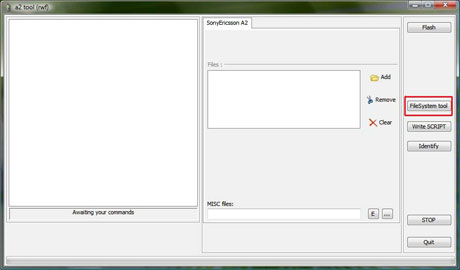
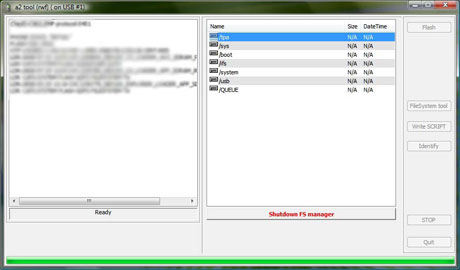
1) Run the A2Uploader and then click on “FileSystem Tool”

2) Navigate to “/tpa/preset/system/desktop/flash”

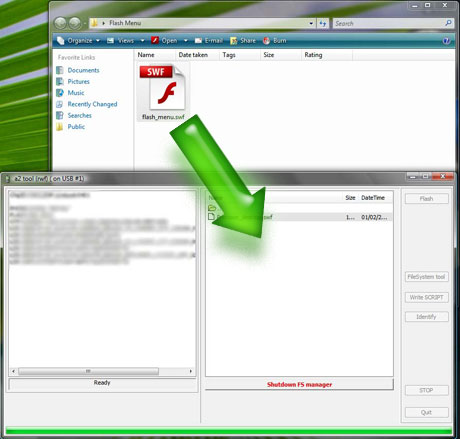
3) Now drag your flash menu into the right side window
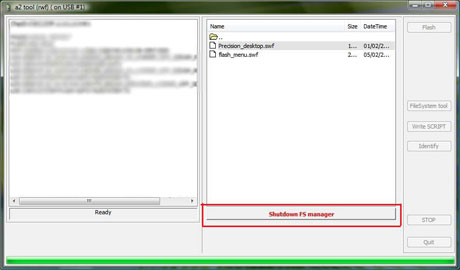
4) Now click on “Shutdown FS Manager”

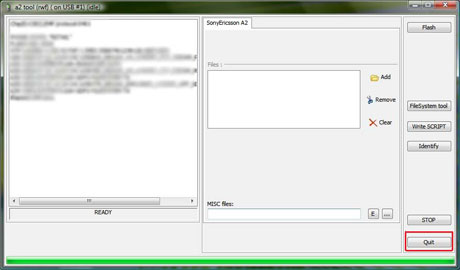
5) Now click on “Quit” to close A2Uploader
If your flash menu came with a theme, then you can skip part 2 and just install the theme
Part 2: Activating the flash menu
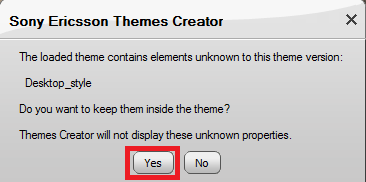
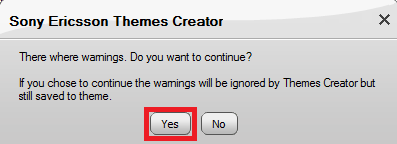
1) Double click your theme file and the Theme Creator will open. If you get a message similar to the one above, just click “Yes”

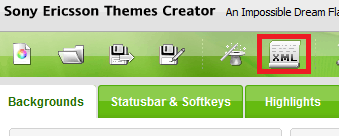
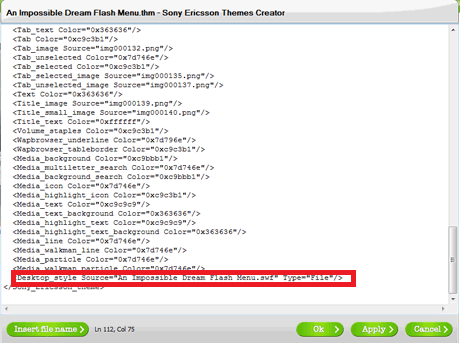
2) Now click on the “XML” icon

3) Now copy and past this line just before the </Sony_Ericsson_theme>, replacing “MenuName” with the name of your flash menu
<Desktop_style Source=”MenuName.swf” Type=”File”/>
Then click on “OK”

4) A box will appear similar to the one above, just click “Yes”

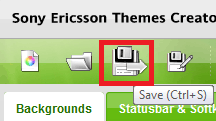
5) Now click on the save icon to save the theme, and simply upload the file to your phone using bluetooth or via the cable
That concludes the tutorial, if you have any queries or have any issues then just let me know
All comments are appreciated!


Hi, If I’ll set another theme will the menu get back to the normal?
Hi Majo358, yes it will go back to normal, unless you link the other theme to the same flash menu
is it necessary to debrand my yari before using this….plzz help me
Hi deep, you don’t have to debrand your Yari to install flash menus
can u plz upload a video or some pictures for doing this…….plz plz
Hi deep, I have many images in this tutorial, which give clear instructions. You can look on YouTube for some videos, or go onto the forum, and ask for additional help from other members. As they may be able to reply to you quicker, than I could
unknown chip id(f002) this error msg i receive always wen i connect my phone with a2 uploader
/…..wat to do ???plz help
Hi deep, you must be using a new phone. try the FarManager tutorial
from theme creator i done every thing but still wen i uploaded it to my phone it was as usual… wat to do???? plz plz plz help
Hi deep, make sure you uploaded the flash menu (.swf) file to “/tpa/preset/system/desktop/flash” and the theme should be in “/tpa/user/theme”, or you could put the theme on your memory card.
Also, check to see if the name of the flash menu matches the one in the code you put in the theme.
For example, if the flash menu is called myflashmenu.swf, then the code to put in the Theme’s XML would be:
<Desktop_style Source=”myflashmenu.swf” Type=”File”/>
how to connect the phone to pc..?
Hi andre, to connect the phone to the pc, use the USB cable, which came with the phone
Does k800i supports flash menus?if no,is there another way to change menu icons and how?
Hi sahan, I think the K800 doesn’t support flash menus, but I’m not sure. Try asking some of the people on the forum, as they may be able to help you
why i cant read my far manager….
i mean…
i list….
extract:ok
far.exe:ok
but when i open,all words like ‘slanting’ and i cant read….
any1 help me pls….
i already download all link far manager i found…
but still same…
Hi Sony Aino User, honestly, I don’t know how you would get un-readable text, try asking some of the people on the forum, as they may have had the same problem as you.
does hazel j20i support flash menus? and how should I add them
Hi Senal, your phone does support flash menus, use the FarManager tutorial, to help you install them.
Hi kr8ter……..
I have downloaded some .thm & .swf files from other sites………
Can i directly use those files without a2uploader………
Can i directly use in SE theme Creator……..??
why bcoz im unable 2 open a2uploder…… my anti virus is blocking whenevr i opened that rar file……..
please infrm me on this topic……….
Hi SriRam, you cannot use a flash menu unless it is uploaded using either A2Uploader or FarManager. Try telling your Ant-Virus to ignore A2Uploader, if that doesn’t work then try using FarManager, which is slightly harder to use, but there is a tutorial for that on the site. Click here to view the FarManger Tutorial.
kr8ter,could you help me please,Ihave an SE aino u10i,the problem is when do all the stuff you wrote, my aino still recognises the “thm”file as demaged…?!?!
I open the theme file, take out the “swf”file, and correct the “xml”file (add the name of the “swf”file into the “xml”file on ‘bevorlast’ line, then save and exit the “xml”file) then I pack it back together into a new “rar”file but without the “swf”file….then rename the “rar” file into the “thm” file…and then:
1) i put the swf file via the FAR menager into “tpa/blablabla…*”
2) shutdown FAR menager and put the fixed thm file (I rename it so it has the same name as the “swf” file) into my phone/phone card via explorer(my computer)…
Then i plug out the phone and and navigate to the themes folder on in…and start the modified theme …but the phone says it is demaged!
could you please help me…or even better could you make some modified themes and then just send me (the “thm” and the “swf”file for each theme)
…please:D
Hi Nair, I think the theme may not have been created for the Aino, Try downloading and installing the Passion theme & flash menu, if that works, then you know that your theme needs to be converted, of which I will gladly help you to do.
hi kr8ter, im very new to this “installing flash menu” thing….. i have got a lot of info bout how to go about installing the flash menus n all…
i just want to know if i could copy many “swf” file into the “/tpa/preset/system/desktop/flash” folder using a2uploader… coz i dont want to use a2uploader everytime i try to use a new flash theme….
plz help
Hi SEW995, yeah, you can upload as many flash menus as you want.
Hi kr8ter how to link a flash menu nd theme using far manager for j20i.
Hi ashuman, just follow part 2 of this tutorial, FarManager is only used to upload files onto your phone
you can do it simply by opening it with note pad
Hi bro I have sony ericsson cedar and I download flash menu files of walkman and drag them in fs by far manager and I also change xml that u have told but now problem is that the icons changes but when I select them they doesn’t open pls help what to do
Hi sushant, it looks like you are using the wrong version of a flash menu, only flash lite 3, flash menus will work on your phone.